RustFS Launches S3 Tables: Apache Iceberg Tables Inside an Open-Source Object Store
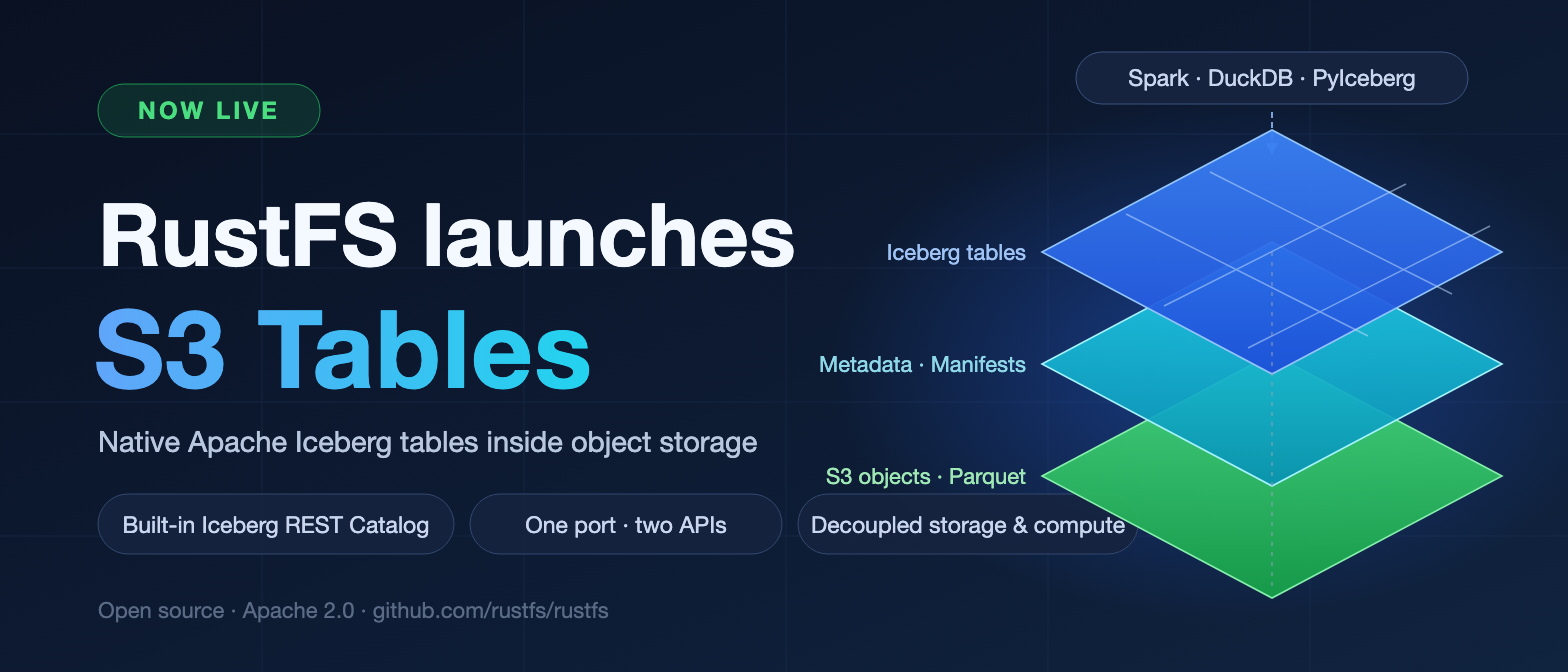
TL;DR: RustFS now ships built-in S3 Tables support: an Apache Iceberg REST Catalog running inside the object storage kernel. One process, one port (9000) — speaking both standard S3 and the Iceberg REST Catalog protocol. Spark, DuckDB, and PyIceberg can create tables and read and write data with no plugins, no extra services, and no license fees. Fully open source under Apache 2.0.
Today we're excited to announce that S3 Tables has officially launched in RustFS — and the feature is open source, like everything else we ship.
One Storage System for Structured and Unstructured Data
Before S3 Tables, most teams ran two storage stacks side by side:
- A data lakehouse for structured data — which, more often than not, still ended up writing its files into S3-compatible storage anyway
- An object store for everything unstructured
That split means two systems to deploy, secure, monitor, and upgrade. It doubles the operational burden and adds integration glue that breaks exactly when you least want it to.
RustFS S3 Tables eliminates that split.
What RustFS S3 Tables Actually Is
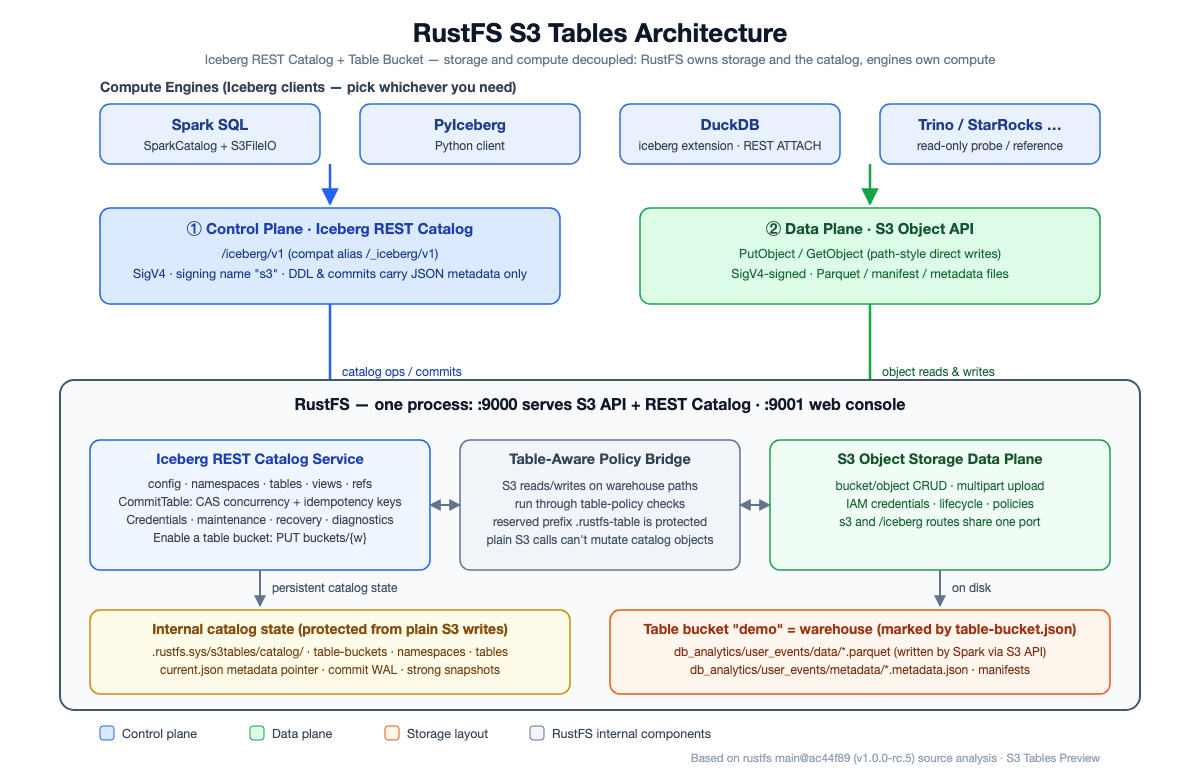
RustFS S3 Tables embeds the Apache Iceberg REST Catalog directly into the object storage kernel. A single process listening on a single port (9000) now speaks two protocols:
- Standard S3 — for objects, exactly as before
- Iceberg REST Catalog — for tables: namespaces, schemas, snapshots, and commits
Because the catalog speaks the open Iceberg REST protocol, engines such as Spark, DuckDB, and PyIceberg need no proprietary plugins to create tables and read and write data. If your engine has an Iceberg REST client, it already works.
How Writes Work: A Control Plane and a Data Plane
Writes follow a clean storage-compute separation:
- Table creation and snapshot commits go through the control plane — the Iceberg REST Catalog. The catalog layer uses CAS (compare-and-swap) version checks to reject stale concurrent commits, and idempotency keys to absorb duplicate submissions, keeping multi-engine concurrent writes consistent.
- The actual Parquet data files are written by the compute engine straight into the bucket over the S3 API — no intermediate layer in the data path.
Metadata pointers live under a reserved internal prefix. Ordinary S3 requests cannot create, overwrite, or delete catalog metadata, so a stray object write can never corrupt the table state.
Quick Start
The fastest way to try S3 Tables is to run RustFS with Docker, enable a table bucket in the console, and point Spark at it. The whole walkthrough takes about ten minutes.
1. Install RustFS with Docker
Spin up a RustFS instance:
docker run -d \
  --name rustfs \
  -p 9000:9000 \
  -p 9001:9001 \
  -v rustfs-data:/data \
  -e RUSTFS_ACCESS_KEY="<your-access-key>" \
  -e RUSTFS_SECRET_KEY="<your-secret-key>" \
  -e RUSTFS_ADDRESS=":9000" \
  -e RUSTFS_CONSOLE_ADDRESS=":9001" \
  -e RUSTFS_CONSOLE_ENABLE=true \
  -e RUSTFS_OBS_LOGGER_LEVEL=error \
  -e RUSTFS_OBS_LOG_DIRECTORY="/var/log/rustfs/" \
  rustfs/rustfs:latest \
  /data
Note: the RustFS container runs as a non-root user. Make sure the data volume or directory (for example, the
rustfs-datavolume above) is owned by UID10001.
Once the container is up, log in to the console at http://<your-ip>:9001 with the access key and secret key you set above.
2. Enable a Bucket as an S3 Table
In the left navigation of the RustFS console you'll find a dedicated S3 Table section.
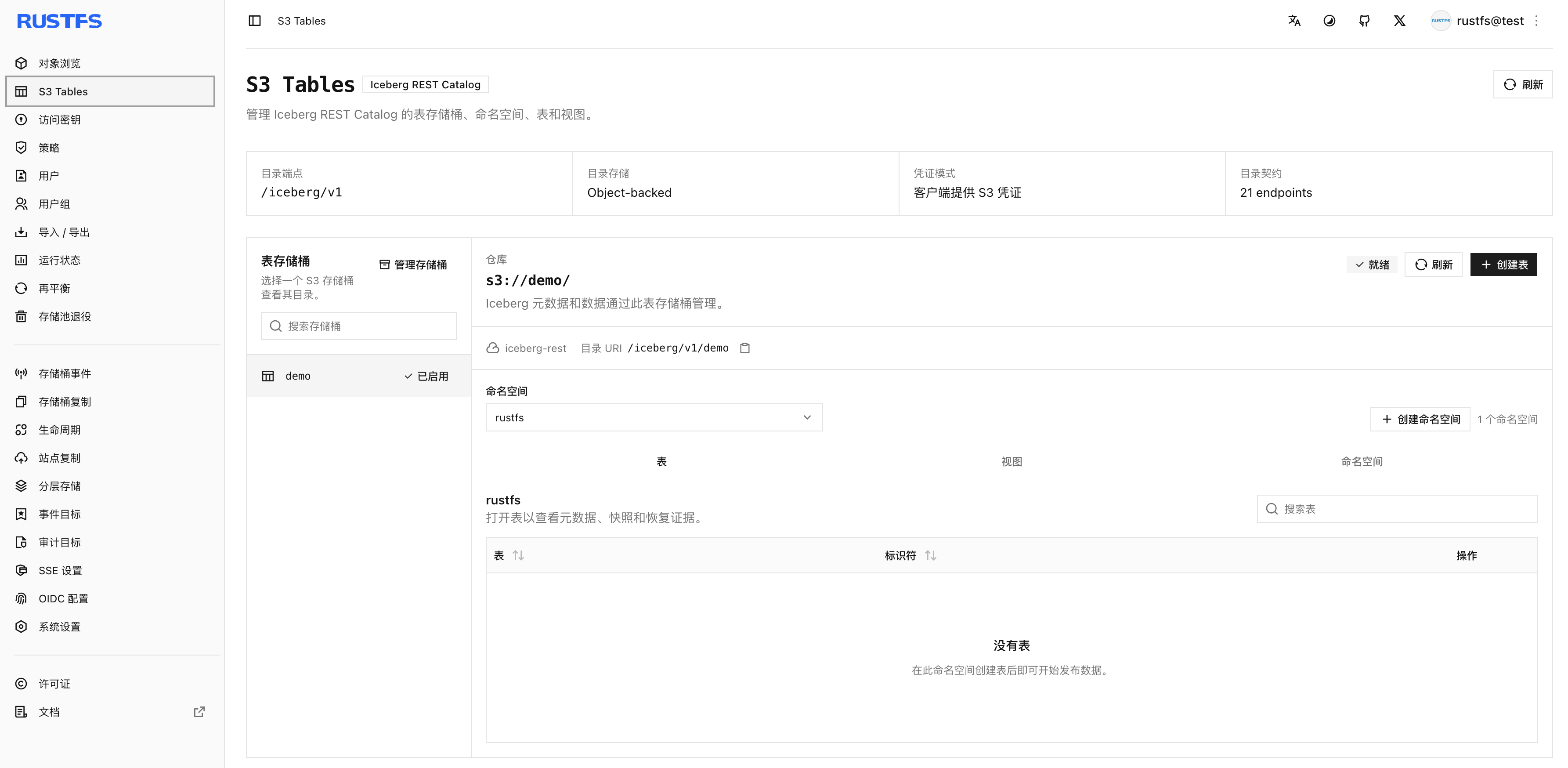
To create an S3 Table, first create a bucket, then convert it into a table bucket using the Enable table bucket action shown below.
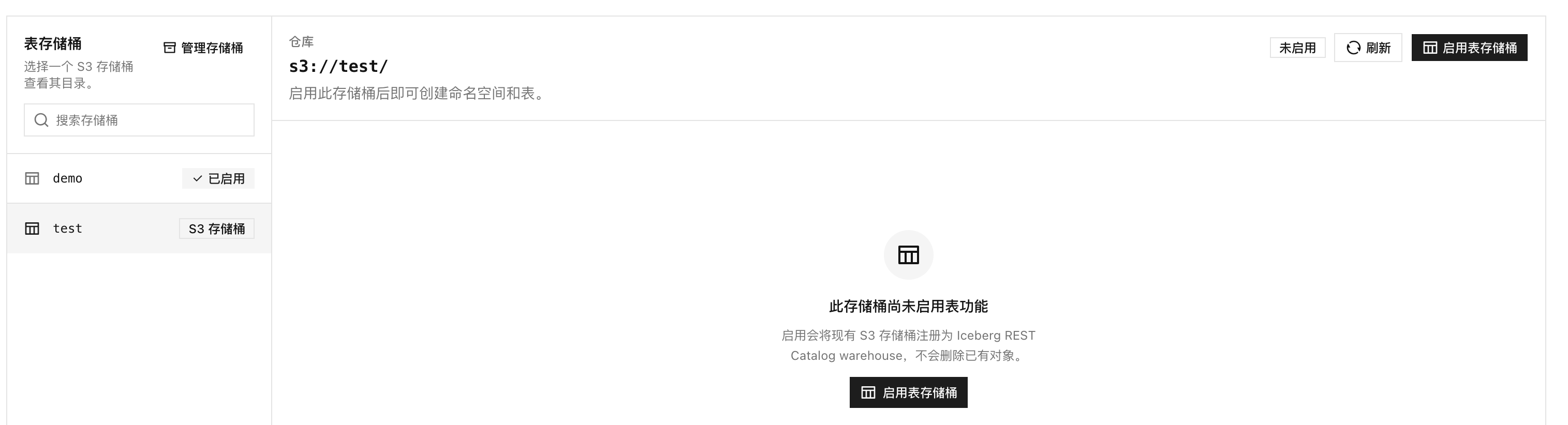
After enabling it, the bucket becomes an S3 Table bucket, and you can create and manage namespaces and tables inside it.
3. Write Data with Apache Spark
You can write to S3 Tables directly from Spark. Here is a complete, self-contained PySpark script:
from pyspark.sql import SparkSession

# ================= Configuration =================
RUSTFS_ENDPOINT = "http://<your-rustfs-host>:9000"
RUSTFS_ACCESS_KEY = "<your-access-key>"
RUSTFS_SECRET_KEY = "<your-secret-key>"
RUSTFS_BUCKET = "test"   # change to your table-enabled bucket name
# =================================================

spark = (
    SparkSession.builder
    .appName("RustFS S3 Tables REST Demo")
    .config(
        "spark.jars.packages",
        "org.apache.iceberg:iceberg-spark-runtime-3.5_2.12:1.5.2,"
        "org.apache.iceberg:iceberg-aws-bundle:1.5.2"
    )
    .config("spark.sql.extensions",
            "org.apache.iceberg.spark.extensions.IcebergSparkSessionExtensions")

    # REST Catalog (control plane)
    .config("spark.sql.catalog.demo", "org.apache.iceberg.spark.SparkCatalog")
    .config("spark.sql.catalog.demo.type", "rest")
    .config("spark.sql.catalog.demo.uri", f"{RUSTFS_ENDPOINT}/iceberg")
    .config("spark.sql.catalog.demo.metrics-reporter.impl", "none")
    .config("spark.sql.catalog.demo.warehouse", RUSTFS_BUCKET)
    .config("spark.sql.catalog.demo.rest.sigv4-enabled", "true")
    .config("spark.sql.catalog.demo.rest.signing-name", "s3")
    .config("spark.sql.catalog.demo.rest.signing-region", "us-east-1")
    .config("spark.sql.catalog.demo.rest.access-key-id", RUSTFS_ACCESS_KEY)
    .config("spark.sql.catalog.demo.rest.secret-access-key", RUSTFS_SECRET_KEY)

    # S3 FileIO (data plane — separate from the REST credentials; configure both)
    .config("spark.sql.catalog.demo.io-impl", "org.apache.iceberg.aws.s3.S3FileIO")
    .config("spark.sql.catalog.demo.s3.endpoint", RUSTFS_ENDPOINT)
    .config("spark.sql.catalog.demo.s3.path-style-access", "true")
    .config("spark.sql.catalog.demo.s3.access-key-id", RUSTFS_ACCESS_KEY)
    .config("spark.sql.catalog.demo.s3.secret-access-key", RUSTFS_SECRET_KEY)
    .config("spark.sql.catalog.demo.s3.region", "us-east-1")
    .getOrCreate()
)

print("Spark session initialized, connecting to RustFS...")

try:
    # 1. Create a namespace (this is what the dropdown in the console UI shows)
    print("Creating namespace: db_analytics ...")
    spark.sql("CREATE NAMESPACE IF NOT EXISTS demo.db_analytics")

    # 2. Create a table
    print("Creating table: user_events ...")
    spark.sql("""
        CREATE TABLE IF NOT EXISTS demo.db_analytics.user_events (
            user_id STRING,
            event_type STRING,
            event_time TIMESTAMP
        ) USING iceberg
        TBLPROPERTIES ('format-version'='2')
    """)

    # 3. Insert test data
    print("Writing test data ...")
    spark.sql("""
        INSERT INTO demo.db_analytics.user_events VALUES
        ('u001', 'click', CAST('2024-01-01 10:00:00' AS TIMESTAMP)),
        ('u002', 'view',  CAST('2024-01-01 11:00:00' AS TIMESTAMP))
    """)

    # 4. Verify with a query
    print("Running verification query ...")
    spark.sql("SELECT * FROM demo.db_analytics.user_events").show()

    print("Success! Refresh the RustFS UI and switch to the 'db_analytics' namespace to see the table.")

except Exception as e:
    print(f"Error: {e}")
Save the script to a file and run it:
python s3-table.py
You should see:
+-------+----------+-------------------+
|user_id|event_type|         event_time|
+-------+----------+-------------------+
|   u001|     click|2024-01-01 10:00:00|
|   u002|      view|2024-01-01 11:00:00|
+-------+----------+-------------------+


Success! Refresh the RustFS UI and switch to the 'db_analytics' namespace to see the table.
4. Verify the Result in the Console
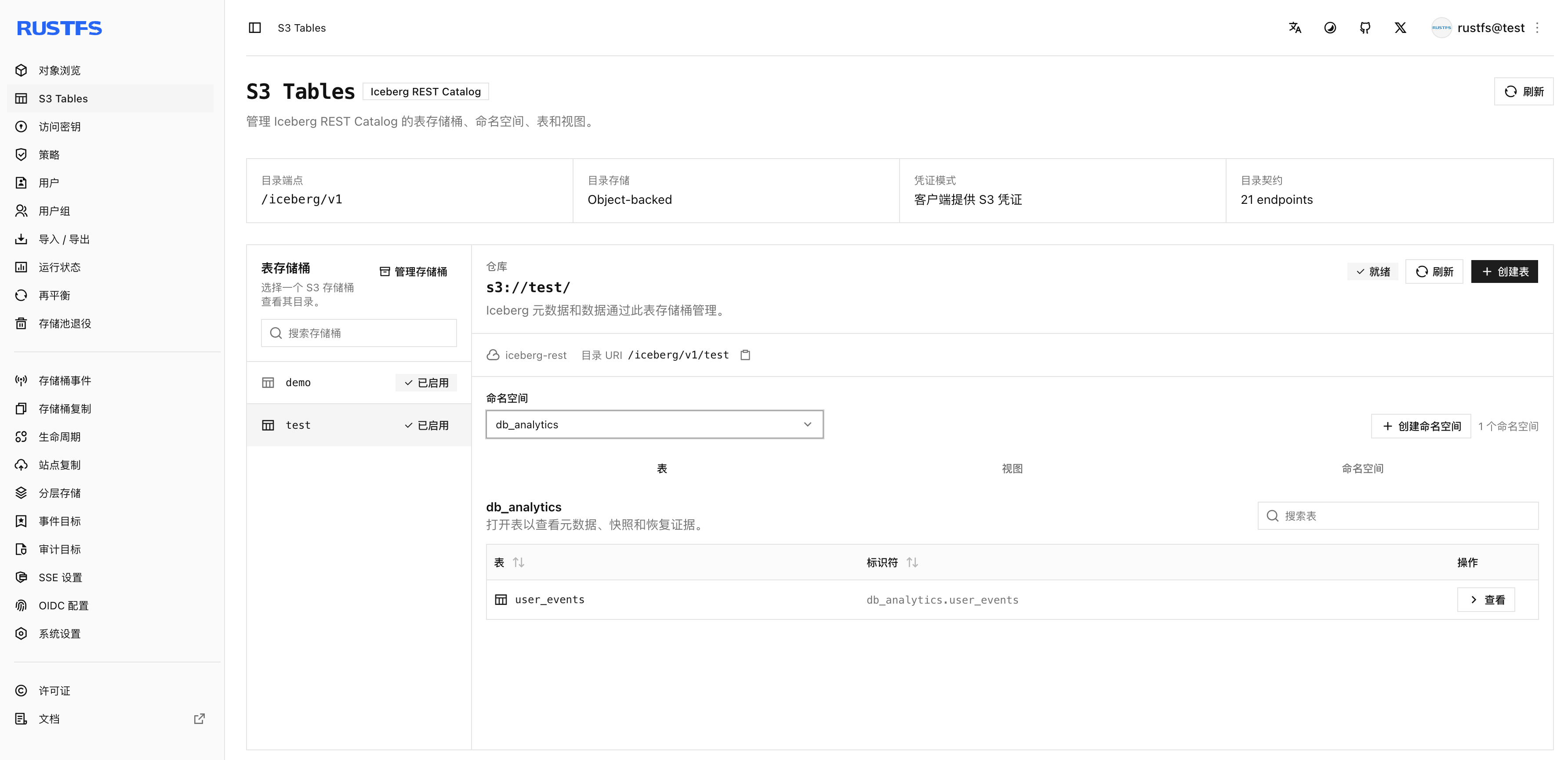
Open the RustFS web console, go to S3 Table, and find the bucket you wrote to — test in the example above. Inside the test table bucket you'll see the db_analytics namespace and, under it, the user_events table.
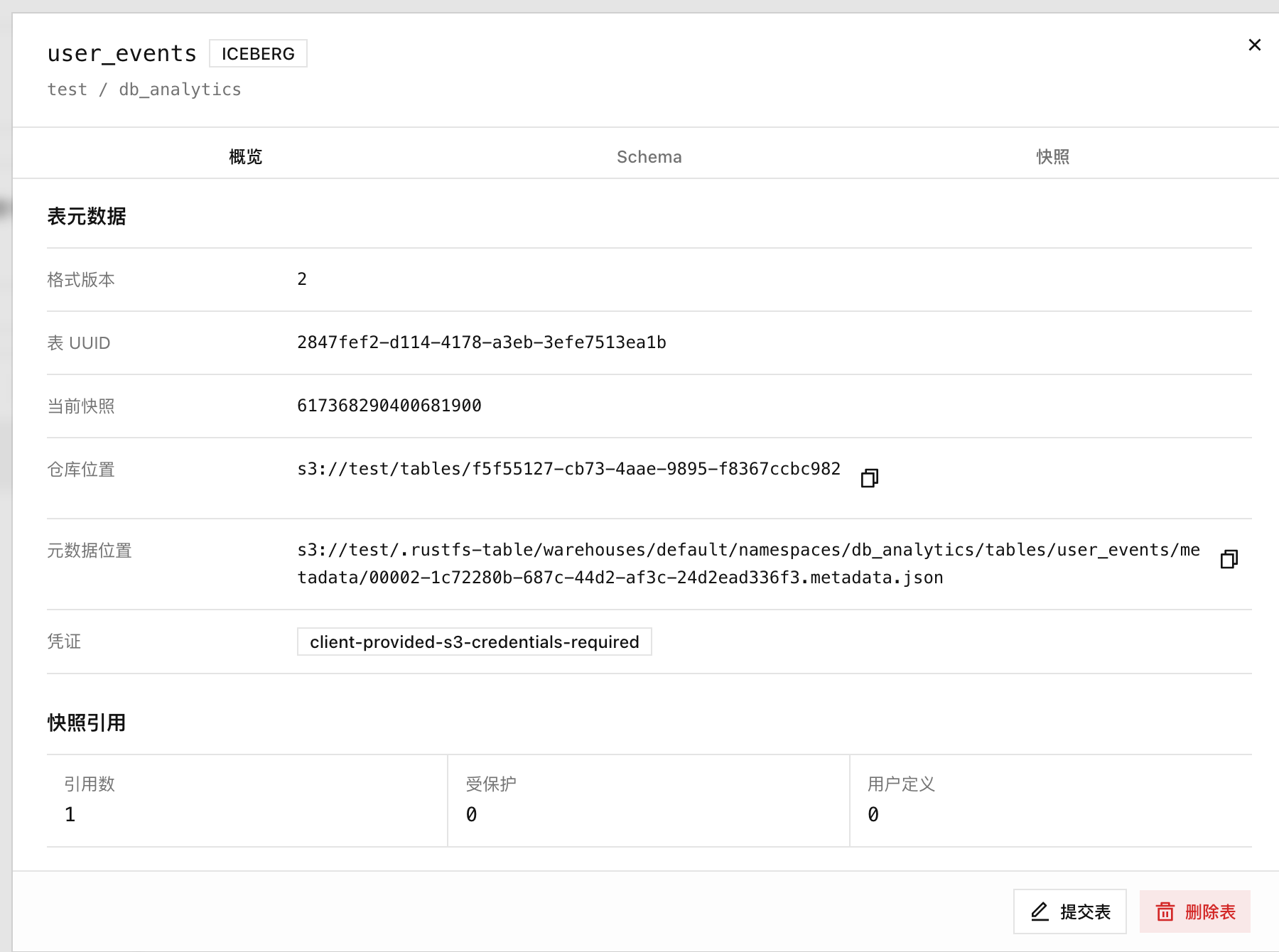
Click the table to inspect its details, including the overview, schema, and snapshots.
What's Next
With S3 Tables, RustFS unifies structured and unstructured data in a single system — simplifying large-scale data management and, in the AI era, accelerating data processing pipelines.
S3 Tables has just launched, and we're iterating fast. If you run into any problems, please open an issue on our official GitHub repo at github.com/rustfs/rustfs — and if you'd like to contribute, PRs are very welcome.
FAQ
Is RustFS S3 Tables free and open source?
Yes. RustFS is licensed under Apache 2.0, and S3 Tables ships as a built-in feature of the storage server. There is no separate commercial edition required to use it.
Which query engines work with RustFS S3 Tables?
Any client that speaks the Iceberg REST Catalog protocol: Apache Spark, PyIceberg, DuckDB, and other Iceberg-compatible engines.
Do I need a separate catalog service like Hive Metastore or AWS Glue?
No. The Iceberg REST Catalog is built into RustFS itself — one fewer system to deploy, secure, and operate.
How does this relate to AWS S3 Tables?
AWS S3 Tables is a managed commercial service. RustFS brings the same category of capability — Iceberg-native tables served directly by your object storage — to a self-hosted, open-source stack, implementing the open Iceberg REST Catalog protocol.
References
- RustFS S3 Tables documentation: docs.rustfs.com/en/administration/data/s3-tables
- RustFS GitHub repository: github.com/rustfs/rustfs