What Is Object Storage? History, Concepts, and How It Works
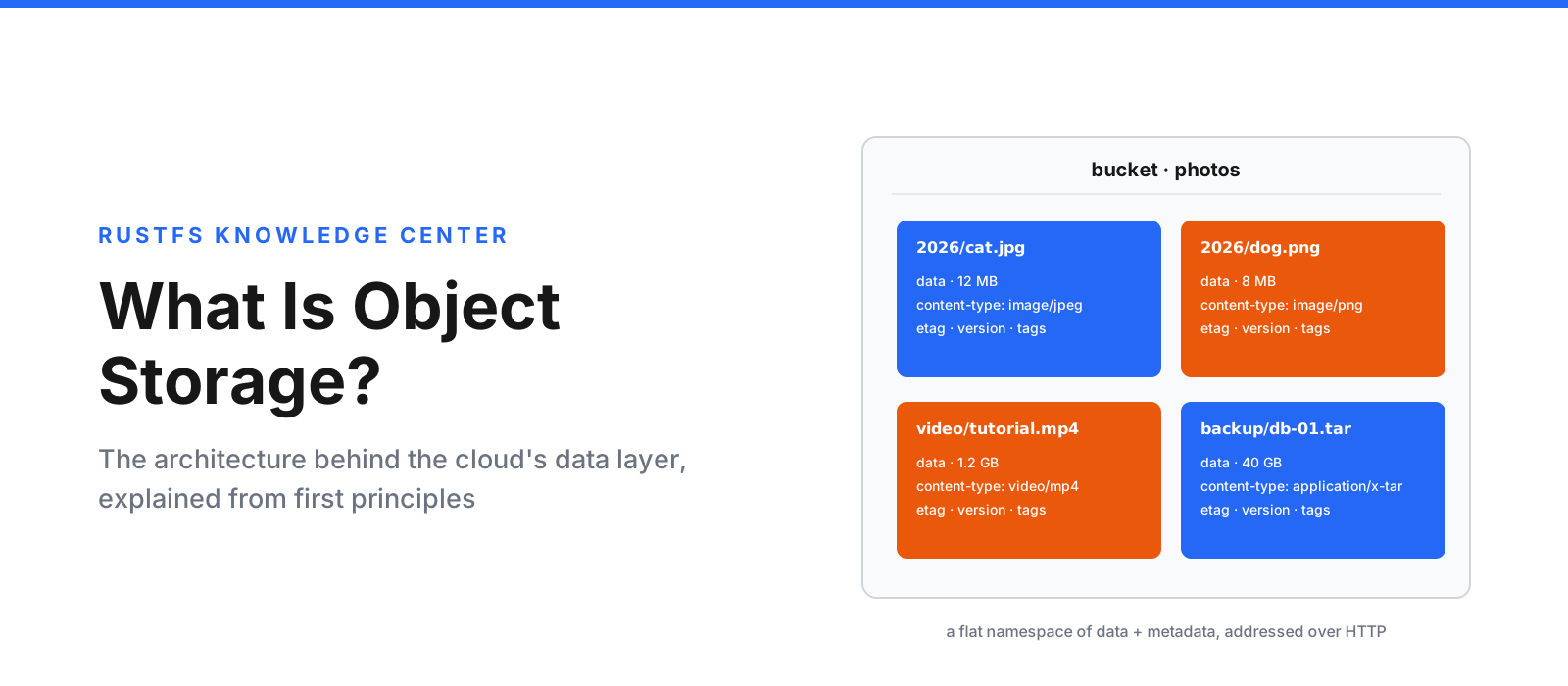
Ask five engineers what object storage is and you will usually get one shared answer — "it's S3" — followed by five different reasons why. The shared answer is not wrong: the S3 API became so dominant that the category and its most famous implementation have merged in most people's minds. But object storage is older than S3, bigger than S3, and built on ideas that are worth understanding on their own terms — especially if you run your own infrastructure.
This article is the ground-up explanation: what object storage is, how it
differs from the block and file storage you already know, where it came from,
how an object actually travels from a PUT to spinning rust (or flash), and
where it shines and struggles. By the end, "object storage" will mean more
than a URL scheme.
Three ways to store a byte
Every storage system answers the same question differently: how do you find this byte again?
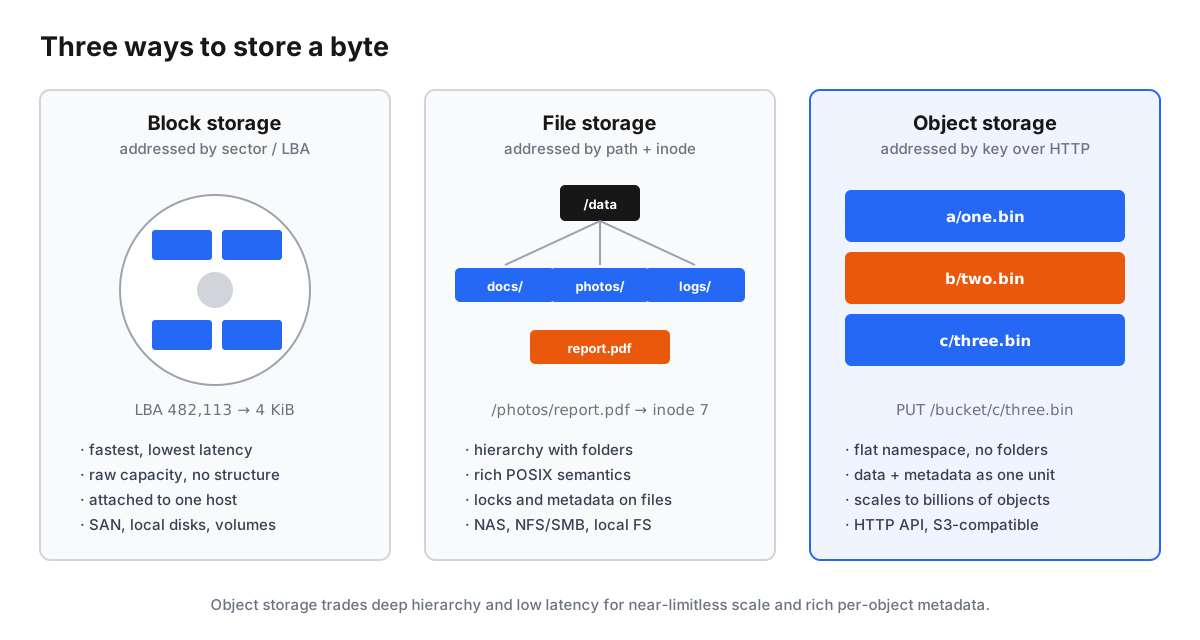
Block storage splits data into fixed-size blocks (traditionally 512 bytes to 4 KiB) and addresses each block by a number — a logical block address, like a house number on a very long street. The storage knows nothing about what the bytes mean. Block devices are the rawest, fastest form of storage: they are what a disk pretends to be, what databases love, and what a hypervisor hands a virtual machine as its "disk". But blocks have no identity beyond their address and no concept of sharing — a volume is attached to one host at a time.
File storage layers a hierarchy on top of blocks: files, directories, permissions, and the POSIX operations every programmer knows. Each file gets an inode — a metadata record the filesystem uses to map a path to data blocks. File storage is the most human-friendly model and still the right tool for shared working data. Its weakness is structural: hierarchies need directories, directories need locks, locks need coordination, and coordination gets expensive at scale. Filesystem metadata is also comparatively poor — a handful of timestamps and permissions, not application-defined data.
Object storage abandons the hierarchy entirely. Data lives in objects,
each self-contained and addressed by a unique key — an arbitrary string
like photos/2026/cat.jpg — retrieved over plain HTTP. Objects bundle three
things into one immutable unit: the bytes, a rich set of metadata, and the
key that addresses them. There are no inodes to update, no directory locks to
negotiate, no filesystem to journal. That simplicity is precisely what lets
object stores hold billions — and in public clouds, hundreds of trillions — of
objects.
| Block | File | Object | |
|---|---|---|---|
| Addressed by | LBA (sector number) | path → inode | key (arbitrary string) |
| Protocol | NVMe, iSCSI, FC | NFS, SMB, POSIX syscalls | HTTP (S3 API) |
| Structure | none | deep hierarchy | flat namespace |
| Metadata | none | fixed inode fields | rich, user-defined |
| Mutability | random read/write | files editable in place | write-once, replace-whole |
| Typical scale | TiB per volume | millions of files | billions of objects |
| Best at | databases, VMs | shared working data | unstructured data at scale |
The "write-once, replace-whole" row is the one that surprises people. In the classic model you cannot open the middle of an object and edit a few bytes — you write a new object, or you read the object, modify it, and put it back. That constraint is not a limitation someone forgot to fix; it is the design decision that makes everything else possible (immutable objects are what allow aggressive caching, trivial replication, checksum verification, and predictable consistency). Modern systems soften the edges — multipart uploads handle large files in pieces, and some platforms add append or range-write extensions — but immutability remains the conceptual core.
A short history of object storage
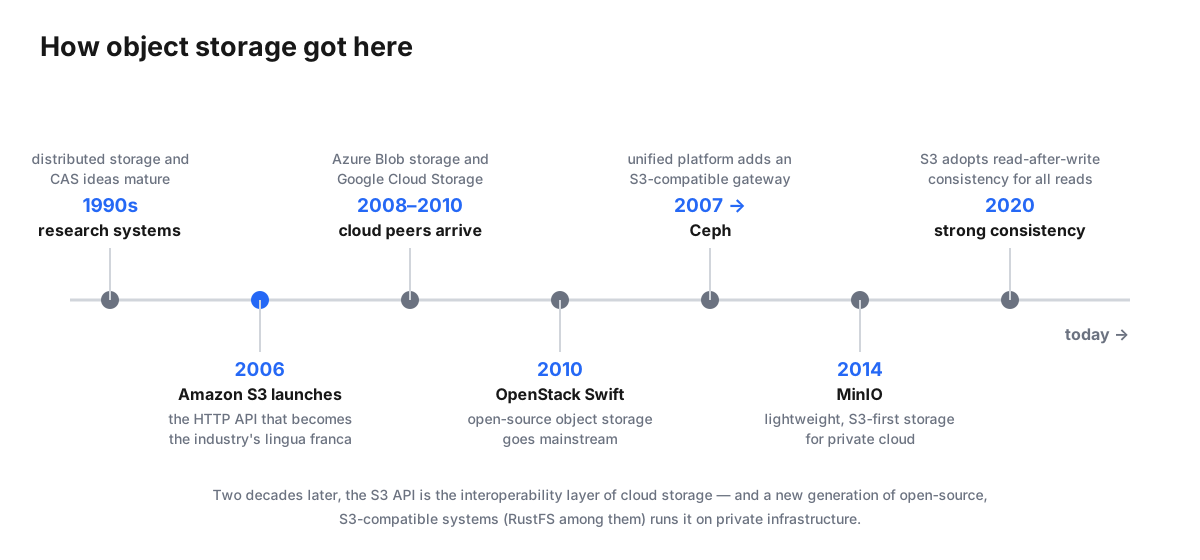
Object storage was not invented in 2006, but it was productized in 2006.
The intellectual roots go back to distributed storage research of the 1990s and early 2000s — systems that explored content-addressable storage, erasure-coded clusters, and the then-radical idea that storage should be accessed through web-style interfaces rather than mounted device semantics. (Ceph began as Sage Weil's PhD work at UC Santa Cruz in that era, in the mid-2000s.) The research consensus: if you give up in-place mutation and deep hierarchies, you can build systems that scale out almost without limit.
Then Amazon shipped the proof. Amazon S3 launched on March 14, 2006 — a web service exposing exactly this model: buckets, keys, HTTP verbs, and a pay per GB price. It arrived alongside AWS's EC2 the same year, and together they defined cloud computing. S3's interface was simple enough to reimplement and useful enough that everyone did. That combination turned the S3 API into the industry's de facto standard — the one interface every storage system, backup tool, analytics engine, and ML framework speaks.
The wave that followed is worth knowing, because it explains today's landscape:
- 2008–2010 — the public clouds follow: Microsoft's Azure Blob Storage and Google Cloud Storage bring object storage to their platforms.
- 2010 — Rackspace open-sources its Cloud Files technology as OpenStack Swift, bringing object storage to private data centers at platform scale.
- 2007 onward — Ceph grows from a research project into a unified open storage platform whose RADOS Gateway exposes an S3-compatible API on top of its own replicated-and-erasure-coded core.
- 2014 — MinIO launches as a lightweight, S3-first object store — a single Go binary that made S3-compatible storage a ten-minute deployment and became the default choice for private cloud and edge.
- 2020 — Amazon S3 moves to strong read-after-write consistency for every operation, retiring the "eventually consistent" caveat that had shaped a decade of workarounds.
- Today — the open-source generation continues: and RustFS (Rust, Apache 2.0, S3-compatible) is part of that story — the same architecture class as the systems above, rebuilt for modern hardware in a memory-safe language.
Anatomy of a bucket and an object
Two nouns carry the entire model: buckets and objects.
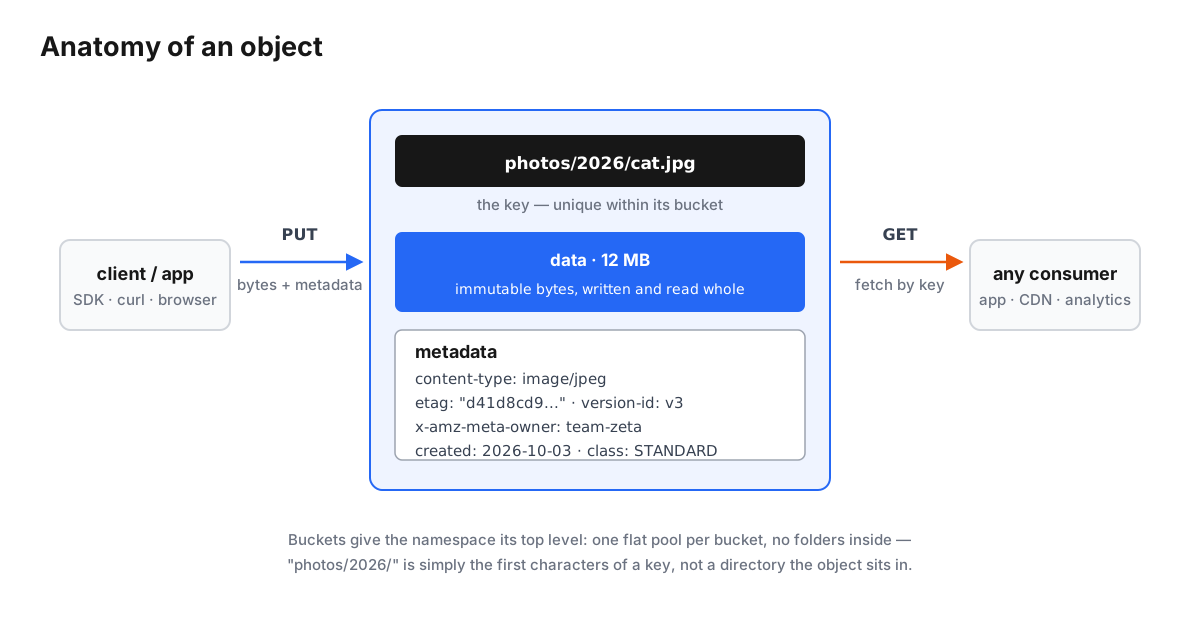
An object is the atomic unit. As the diagram below shows, it has three parts:
- A key — the object's unique name within its bucket, such as
photos/2026/cat.jpg. Keys are just strings; the system attaches no meaning to them. - The data — the bytes themselves, written and read whole.
- Metadata — a key-value map describing the object: content type, length, a checksum or ETag, a version identifier, timestamps, and — crucially — user-defined metadata your application invents.
A bucket is the top-level container: a flat namespace with a globally
unique name. Create a bucket, and every object you PUT into it lives in that
one flat pool. There is no folder structure inside — photos/2026/cat.jpg is
not a file sitting in two nested directories; it is a single string that
happens to contain slashes. Tools render keys as trees for human convenience,
but the storage engine only ever sees keys, and that is why listing, batching,
and partitioning at scale stay simple.
Two properties of this model deserve attention:
Immutability with versioning. You never edit an object; you replace it. S3-style systems add versioning: every write creates a new immutable version with its own ID, and the "latest" pointer moves. Old versions remain — which turns accidental deletes and ransomware-style overwrites into recoverable events rather than disasters.
Metadata as a first-class citizen. File systems give you permissions and timestamps. Object stores let each object carry application-defined metadata and tags — which is what makes object storage a natural fit for pipelines that need to route, filter, or audit data by policy rather than by path.
What actually happens on a PUT
Here is the journey of a PUT /photos/2026/cat.jpg against a distributed
object store like RustFS — and it is where object storage stops being a
concept and becomes an engineering system:
- Route to a placement unit. The key is mapped to a set of drives — a fixed group (RustFS uses sets of 2–16 drives) whose members are chosen by hashing the key. Different objects land on different sets, so no single drive is everyone's bottleneck or everyone's failure.
- Stripe and protect. The object's bytes are cut into 1 MiB stripes, and each stripe is encoded into data + parity shards spread across the set's drives — Reed-Solomon erasure coding, the same math that lets the cluster survive drive failures without keeping full copies. (We walk through that mathematics in Erasure Coding Explained.)
- Verify on the way down. Each shard is written with a strong checksum so that silent corruption — bit rot — is detected on every read, not at backup time.
- Commit metadata. A metadata record ties the key to its layout: which
set, which shard order, checksums, version, size. This record is what a
later
GETconsults.
A GET runs the path in reverse: hash the key, read the metadata, fetch
shards from k of the drives (fewer if some are offline), verify checksums,
reconstruct anything missing, and stream the bytes back. With all drives
healthy, the parity work is skipped entirely — reads are pure concatenation.
This is the essential loop of every serious object store. The differences between products are mostly how well they execute it: how fast the encode path runs, how quickly failures heal, how gracefully the cluster rebalances, and how much of the S3 surface they implement.
Why object storage won unstructured data
Look at the design decisions together and the pattern is clear — every one of them trades something a database or filesystem wants for something scale needs:
- Flat namespace — no directory trees means no metadata hot spots, no recursive locks, no rename storms. Adding objects is embarrassingly parallel.
- HTTP semantics — every language, every platform, every CDN already speaks HTTP. No driver installs, no mount tables.
- Immutability — caches can be aggressive, checksums can be absolute, replication can be asynchronous, and consistency can be strong (the 2020 S3 change proved immutability and strong consistency are compatible).
- Rich metadata — policy (lifecycle rules, retention, access tiers) can operate on what the data is, not just where it sits.
- Erasure coding instead of copies — durability mathematically, at half the overhead of 3× replication for the same fault tolerance.
And the honest limits, because they shape real architectures:
- No in-place edits. Fine for photos and archives; a problem for mutable working sets. (Databases and file shares belong on other storage.)
- Latency. An HTTP request plus parity math will not beat a local NVMe device, and it is not trying to.
- The POSIX gap. Applications that truly need filesystem semantics use gateways, mounts, or caches that bridge objects to files — useful, but a bridge, not a union.
Where it's used
If data is written more than it is edited, it probably belongs in object storage:
- Backup and archive — versioned, checksum-verified, lifecycle-managed copies; the classic first workload.
- Data lakes and analytics — data lakes are object buckets with table formats (Iceberg, Delta Lake, Parquet) on top; query engines read objects directly over S3 APIs.
- AI/ML pipelines — datasets, model checkpoints, and artifacts are huge, immutable, and read by fleets of GPU workers in parallel.
- Media and static assets — images, video, and website assets served via CDNs that pull straight from buckets.
- Cloud-native infrastructure — container registries, CI artifacts, logs, and traces are all objects; Kubernetes stateful ecosystems standardized on S3 APIs years ago.
- Compliance and retention — object locking (write-once-read-many) makes deletion-before-deadline impossible by construction.
The systems that define the category
| System | What it is |
|---|---|
| Amazon S3 | The 2006 original; its API is the industry standard |
| Azure Blob Storage, Google Cloud Storage | The public-cloud equivalents, each with S3-compatible interop layers |
| Ceph (RADOS Gateway) | Unified open-source storage; S3 API over its replicated/EC core |
| OpenStack Swift | Open-source object storage born from Rackspace Cloud Files |
| MinIO | S3-first, single-binary private-cloud object store |
| RustFS | Modern S3-compatible store in Rust (Apache 2.0) — erasure coding, bitrot protection, self-healing |
| Garage, SeaweedFS, others | The long tail of purpose-built open-source stores |
Two trends matter when you read this table. First, S3 compatibility is the
interoperability contract: even systems with their own native APIs expose
S3 endpoints, because the ecosystem — backup tools, frameworks, data
engines — assumes it. Second, the core verbs are a small, learnable set:
PUT, GET, DELETE, LIST, plus multipart upload for big files, presigned
URLs for temporary access, and versioning/lifecycle controls. Everything else
is convenience layered on top.
Object storage, the RustFS way
RustFS is part of the newest generation: an S3-compatible object store written in Rust under Apache 2.0, built around the same principles this article described — and implemented with the details covered in our erasure coding deep dive:
- Objects are erasure-coded in 1 MiB stripes across erasure sets of 2–16 drives, with parity chosen per set size and capped at half the drives — the durability/capacity dial described above.
- Every shard carries a HighwayHash-256 checksum verified on read, so bit rot is caught and routed into reconstruction instead of delivered to your application.
- Self-healing rebuilds lost shards onto replacement drives stripe by stripe, and per-object shard distribution spreads failures so one dead drive costs every object one shard — not any object everything.
- The S3 API surface — buckets, objects, versioning, lifecycle — is the contract, so the tools you already use work unchanged.
If you want the low-level story behind point one and two — the finite-field arithmetic, the generator matrices, the recovery path — read Erasure Coding Explained. To play with the durability/capacity trade-off for your own drive count, the erasure code calculator does the math for you.
The one-paragraph answer
Object storage is the storage architecture that stopped pretending data has a folder. It takes bytes, gives them a key and a rich set of metadata, makes them immutable, protects them with mathematical redundancy, and serves them over HTTP at a scale no filesystem can match. It was proven by Amazon S3 in 2006, standardized by everyone who reimplemented it, and it is now the default home for the world's unstructured data — backups, data lakes, media, and the training sets behind every AI system. And with open-source, S3-compatible systems like RustFS, you no longer need a hyperscaler's budget to run it.